Add products quickly
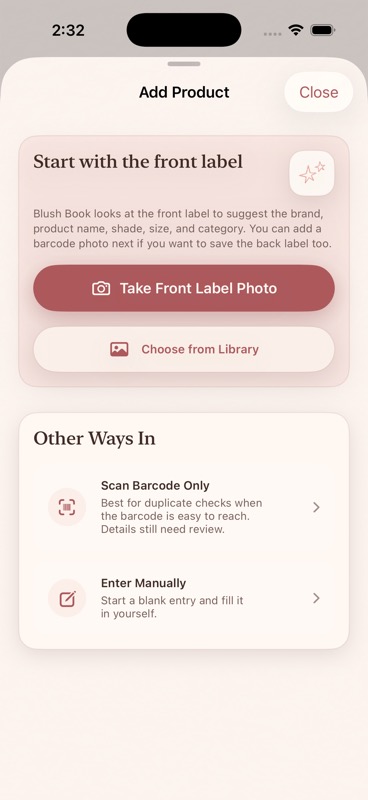
Start with a photo or enter details yourself. Review suggested fields before saving anything.
Know what beauty products you own before you buy more.
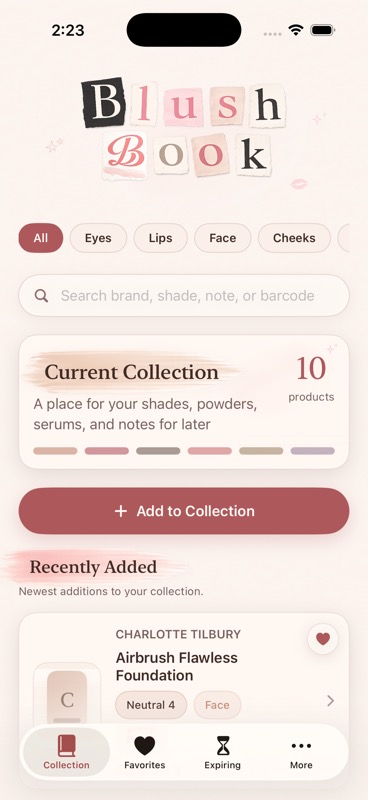
Add makeup, skincare, fragrance, and tools with photos or manual entry. Save shades, notes, favorites, barcodes, and local expiration reminders in one personal beauty drawer.
Blush Book helps you shop your stash before buying another shade, remember product details at a glance, and spot items that may need attention soon. It is made for personal beauty products, with simple tools for photos, shades, notes, categories, favorites, archive, and expiration reminders.
Start with a photo or enter details yourself. Review suggested fields before saving anything.
Browse by face, lips, eyes, cheeks, skin, fragrance, tools, and other product types.
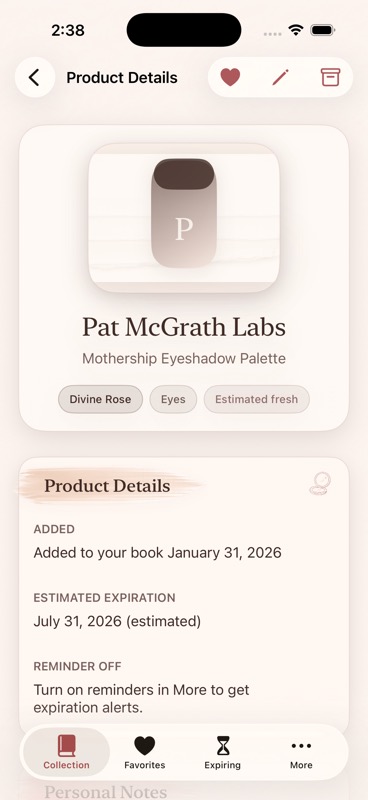
Mark favorites, archive products you are not using, and set local reminders before products expire.
A few examples of how Blush Book helps you add products, browse your collection, and keep useful notes close.
Need help, want to report an issue, or have an idea for Blush Book? Email any time.
Blush Book stores your beauty collection information locally on your device. This can include product names, categories, shades, sizes, barcodes, expiration dates, notes, product photos, archive status, favorites, and reminder preferences. Blush Book does not require an account and does not use third-party analytics or advertising SDKs.
Camera, photo, barcode, and notification access are used only to provide app features you choose to use. Product photos and collection details are not sent to the developer. If you email feedback, your email address and message are handled through your email provider and used only to respond to your note.
Optional support purchases are processed by Apple through StoreKit. Blush Book does not receive or store your payment card details.